服务器运维
Linux
2025-04-09 15:50
阅读:342
评论:0
Linux 一键屏蔽指定国家所有的IP访问
Linux下通过防火墙一键屏蔽指定国家所有的IP访问 封禁 image 封禁列表 image 解封 image 使用root执行以下命令: block-ips.sh脚本如下 执行service iptables save命令永久保存规则 通过ipset save > ipset_backup.txt
Linux下通过防火墙一键屏蔽指定国家所有的IP访问
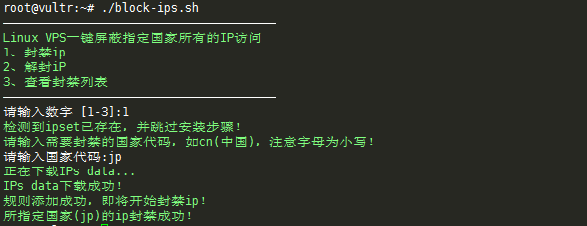
- 封禁
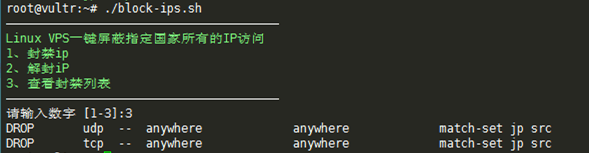
- 封禁列表
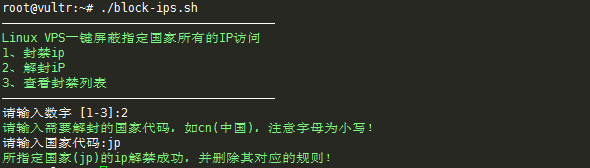
- 解封
- 使用
root执行以下命令:
1
2
3
wget https://www.moerats.com/usr/shell/block-ips.shchmod +x block-ips.sh./block-ips.sh- block-ips.sh脚本如下
1
2
3
4
5
6
7
8
9
10
11
12
13
14
15
16
17
18
19
20
21
22
23
24
25
26
27
28
29
30
31
32
33
34
35
36
37
38
39
40
41
42
43
44
45
46
47
48
49
50
51
52
53
54
55
56
57
58
59
60
61
62
63
64
65
66
67
68
69
70
71
72
73
74
75
76
77
78
79
80
81
82
83
84
85
86
87
88
89
90
91
92
93
94
95
96
97
98
99
100
101
102
103
104
105
106
107
108
109
110
111
112
113
114
115
116
117
118
119
120
121
122
123
124
125
126
#! /bin/bash#Block-IPs-from-countries#Github:https://github.com/iiiiiii1/Block-IPs-from-countries#Blog:https://www.moerats.com/ Green="\033[32m"Font="\033[0m" #root权限root_need(){ if [[ $EUID -ne 0 ]]; then echo "Error:This script must be run as root!" 1>&2 exit 1 fi} #封禁ipblock_ipset(){check_ipset#添加ipset规则echo -e "${Green}请输入需要封禁的国家代码,如cn(中国),注意字母为小写!${Font}"read -p "请输入国家代码:" GEOIPecho -e "${Green}正在下载IPs data...${Font}"wget -P /tmp http://www.ipdeny.com/ipblocks/data/countries/$GEOIP.zone 2> /dev/null#检查下载是否成功 if [ -f "/tmp/"$GEOIP".zone" ]; then echo -e "${Green}IPs data下载成功!${Font}" else echo -e "${Green}下载失败,请检查你的输入!${Font}" echo -e "${Green}代码查看地址:http://www.ipdeny.com/ipblocks/data/countries/${Font}" exit 1 fi#创建规则ipset -N $GEOIP hash:netfor i in $(cat /tmp/$GEOIP.zone ); do ipset -A $GEOIP $i; donerm -f /tmp/$GEOIP.zoneecho -e "${Green}规则添加成功,即将开始封禁ip!${Font}"#开始封禁iptables -I INPUT -p tcp -m set --match-set "$GEOIP" src -j DROPiptables -I INPUT -p udp -m set --match-set "$GEOIP" src -j DROPecho -e "${Green}所指定国家($GEOIP)的ip封禁成功!${Font}"} #解封ipunblock_ipset(){echo -e "${Green}请输入需要解封的国家代码,如cn(中国),注意字母为小写!${Font}"read -p "请输入国家代码:" GEOIP#判断是否有此国家的规则lookuplist=`ipset list | grep "Name:" | grep "$GEOIP"` if [ -n "$lookuplist" ]; then iptables -D INPUT -p tcp -m set --match-set "$GEOIP" src -j DROP iptables -D INPUT -p udp -m set --match-set "$GEOIP" src -j DROP ipset destroy $GEOIP echo -e "${Green}所指定国家($GEOIP)的ip解封成功,并删除其对应的规则!${Font}" else echo -e "${Green}解封失败,请确认你所输入的国家是否在封禁列表内!${Font}" exit 1 fi} #查看封禁列表block_list(){ iptables -L | grep match-set} #检查系统版本check_release(){ if [ -f /etc/redhat-release ]; then release="centos" elif cat /etc/issue | grep -Eqi "debian"; then release="debian" elif cat /etc/issue | grep -Eqi "ubuntu"; then release="ubuntu" elif cat /etc/issue | grep -Eqi "centos|red hat|redhat"; then release="centos" elif cat /proc/version | grep -Eqi "debian"; then release="debian" elif cat /proc/version | grep -Eqi "ubuntu"; then release="ubuntu" elif cat /proc/version | grep -Eqi "centos|red hat|redhat"; then release="centos" fi} #检查ipset是否安装check_ipset(){ if [ -f /sbin/ipset ]; then echo -e "${Green}检测到ipset已存在,并跳过安装步骤!${Font}" elif [ "${release}" == "centos" ]; then yum -y install ipset else apt-get -y install ipset fi} #开始菜单main(){root_needcheck_releaseclearecho -e "———————————————————————————————————————"echo -e "${Green}Linux VPS一键屏蔽指定国家所有的IP访问${Font}"echo -e "${Green}1、封禁ip${Font}"echo -e "${Green}2、解封iP${Font}"echo -e "${Green}3、查看封禁列表${Font}"echo -e "———————————————————————————————————————"read -p "请输入数字 [1-3]:" numcase "$num" in 1) block_ipset ;; 2) unblock_ipset ;; 3) block_list ;; *) clear echo -e "${Green}请输入正确数字 [1-3]${Font}" sleep 2s main ;; esac}main- 执行
service iptables save命令永久保存规则 - 通过
ipset save > ipset_backup.txt可以导出封禁的IP段
屏蔽cn需谨慎,代表的是中国,屏蔽后在国内就登录不然服务器了
- 来源:https://www.moerats.com/archives/585/
可能需要关注的问题
- https://www.ipdeny.com/ipblocks/data/countries/xxxx.zone 下载的文件中可能没有指定的IP段
- 例如
93.123.109.128地址,通过查询显示属于荷兰国家IP段,荷兰国家代码为NL,通过https://www.ipdeny.com/ipblocks/data/countries/nl.zone下载文件,搜索竟然没有93.123.xx.xx开头的IP段 - 通过下载
https://ftp.ripe.net/pub/stats/ripencc/delegated-ripencc-latest文件搜索,能搜索到此IP段,通过此文件显示段国家代码,下载bg.zone文件并搜索93.123.xx.xx却能搜索到,而gb国家代码是保加利亚的