Hadoop
Hadoop
2025-04-08 14:28
阅读:161
评论:0
Hadoop之MapReduce经典单词统计案例
jdk环境变量配置tools.jar 命令方式编译java文件 创建WordCount.java文件 内容如下: 编译WordCount.java文件 hadoop com.sun.tools.javac.Main ./WordCount.java 将编译好的class打包成jar包 jar cf
jdk环境变量配置tools.jar
1
2
# ./hadoop com.sun.tools.javac.Main WordCount.java 变量需要的环境变量配置export HADOOP_CLASSPATH=${JAVA_HOME}/lib/tools.jar命令方式编译java文件
创建WordCount.java文件
- 内容如下:
1
2
3
4
5
6
7
8
9
10
11
12
13
14
15
16
17
18
19
20
21
22
23
24
25
26
27
28
29
30
31
32
33
34
35
36
37
38
39
40
41
42
43
44
45
46
47
48
49
50
51
52
53
54
55
56
57
58
59
60
61
62
63
64
65
66
67
68
69
70
71
72
73
74
75
76
77
78
79
80
81
82
83
84
85
86
87
88
89
90
91
92
93
94
95
96
97
98
99
100
101
102
103
104
105
106
107
108
109
110
111
112
113
114
115
116
117
118
119
120
121
122
123
124
125
126
127
128
129
import java.io.IOException;import java.util.StringTokenizer; import org.apache.hadoop.conf.Configuration;import org.apache.hadoop.fs.Path;import org.apache.hadoop.io.IntWritable;import org.apache.hadoop.io.Text;import org.apache.hadoop.mapreduce.Job;import org.apache.hadoop.mapreduce.Mapper;import org.apache.hadoop.mapreduce.Reducer;import org.apache.hadoop.mapreduce.lib.input.FileInputFormat;import org.apache.hadoop.mapreduce.lib.output.FileOutputFormat;import org.apache.commons.logging.Log;import org.apache.commons.logging.LogFactory; /** * 主类WordCount,实现Hadoop MapReduce单词计数功能 * * @author wency_cai */public class WordCount { // Mapper类,负责将输入数据分割成单词并计数 public static class TokenizerMapper extends Mapper<Object, Text, Text, IntWritable> { // 定义一个常量1,类型为IntWritable(Hadoop的整数类型) private final static IntWritable ONE = new IntWritable(1); // 用于存储单词的Text对象(Hadoop的字符串类型) private final Text word = new Text(); // map方法,处理每一行输入数据 @Override public void map(Object key, Text value, Context context) throws IOException, InterruptedException { // 使用StringTokenizer将输入文本分割成单词 StringTokenizer itr = new StringTokenizer(value.toString()); // 遍历所有单词 while (itr.hasMoreTokens()) { // 设置当前单词到Text对象中 word.set(itr.nextToken()); // 输出键值对:<单词, 1> context.write(word, ONE); } } } // Reducer类,负责汇总相同单词的计数 public static class IntSumReducer extends Reducer<Text, IntWritable, Text, IntWritable> { private static final Log LOG = LogFactory.getLog(IntSumReducer.class); // 用于存储最终结果的IntWritable对象 private final IntWritable result = new IntWritable(); // reduce方法,处理Mapper输出的中间结果 @Override public void reduce(Text key, Iterable<IntWritable> values, Context context) throws IOException, InterruptedException { int sum = 0; // 初始化计数器 String word = key.toString(); // 遍历所有相同单词的计数值 for (IntWritable val : values) { LOG.info(word + "数量:========> " + val.get()); sum += val.get(); // 累加计数 } // 设置最终计数结果 result.set(sum); // 输出键值对:<单词, 总出现次数> context.write(key, result); } } public static class IntSumCombiner extends Reducer<Text, IntWritable, Text, IntWritable> { private static final Log LOG = LogFactory.getLog(IntSumCombiner.class); // 用于存储最终结果的IntWritable对象 private final IntWritable result = new IntWritable(); // reduce方法,处理Mapper输出的中间结果 @Override public void reduce(Text key, Iterable<IntWritable> values, Context context) throws IOException, InterruptedException { String word = key.toString(); int sum = 0; // 初始化计数器 // 遍历所有相同单词的计数值 for (IntWritable val : values) { LOG.info(word + "数量IntSumCombiner:========> " + val.get()); sum += val.get(); // 累加计数 } // 设置最终计数结果 result.set(sum); // 输出键值对:<单词, 总出现次数> context.write(key, result); } } // 主方法,配置和启动MapReduce作业 public static void main(String[] args) throws Exception { // 创建Hadoop配置对象 Configuration conf = new Configuration(); // 创建一个新的MapReduce作业,命名为"word count" Job job = Job.getInstance(conf, "word count"); // 设置作业的主类 job.setJarByClass(WordCount.class); // 设置Mapper类 job.setMapperClass(TokenizerMapper.class); // 设置Combiner类,可选(这里可以将IntSumCombiner改为IntSumReducer作为Combiner),在单词计数中,Combiner和Reducer的逻辑完全相同(都是对值求和),所以可以直接复用 // 但某些场景下Combiner和Reducer的逻辑可能不同(如求平均值时,Combiner需要传递<sum, count>,而Reducer计算sum/count) // Combiner的输出格式必须和Reducer的输入格式一致 // Combiner 的作用 // 本地聚合:Combiner 在 每个Mapper节点本地 对输出进行初步聚合(比如对相同单词的1求和),但它的输出仍然是中间结果,而不是最终结果 // 目的:减少从Mapper到Reducer的网络传输量(例如,原本需要传输3条<hello, 1>,Combiner后只需传输1条<hello, 3>),提高程序执行效率,减少IO传输 job.setCombinerClass(IntSumCombiner.class); // 设置Reducer类 job.setReducerClass(IntSumReducer.class); // 设置输出键的类型(Text,即单词) job.setOutputKeyClass(Text.class); // 设置输出值的类型(IntWritable,即计数) job.setOutputValueClass(IntWritable.class); // 设置输入文件路径(从命令行参数获取) FileInputFormat.addInputPath(job, new Path(args[0])); // 设置输出文件路径(从命令行参数获取) FileOutputFormat.setOutputPath(job, new Path(args[1])); // 提交作业并等待完成,根据结果返回系统退出码(0表示成功,1表示失败) System.exit(job.waitForCompletion(true) ? 0 : 1); }}编译WordCount.java文件
hadoop com.sun.tools.javac.Main ./WordCount.java
将编译好的class打包成jar包
jar cf wc.jar WordCount*.class- 最终文件如下图

maven项目打包jar
maven项目依赖配置
- 创建一个maven项目引入以下依赖配置
1
2
3
4
5
6
7
8
9
10
11
12
13
14
15
16
17
18
19
20
21
22
23
24
25
26
27
28
29
<dependency> <groupId>org.apache.hadoop</groupId> <artifactId>hadoop-client</artifactId> <version>3.1.1</version></dependency> <!-- ================================== --><build> <plugins> <plugin> <artifactId>maven-assembly-plugin</artifactId> <configuration> <descriptorRefs> <descriptorRef>jar-with-dependencies</descriptorRef> </descriptorRefs> </configuration> <executions> <execution> <id>make-assembly</id> <phase>package</phase> <goals> <goal>single</goal> </goals> </execution> </executions> </plugin> </plugins></build>- 在项目中创建上面的
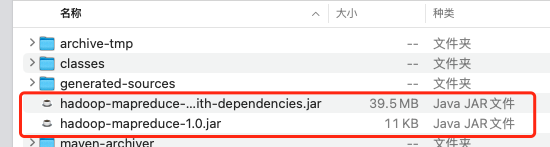
WordCount类,然后编译打包,打包完成会生成两个jar,一个是带依赖包,一个是没有依赖包,我们要的是hadoop-mapreduce-1.0.jar包,如图
- 将
hadoop-mapreduce-1.0.jar命名为wc.jar,这里的命名随意,这里只是为了跟命令打包方式生成的jar保持一致而已
执行单词统计运算
- 执行统计:
hadoop jar wc.jar WordCount /data/inputword /data/output,maven项目生成的jar执行命令则是为hadoop jar wc.jar com.demo.WordCount /data/inputword /data/output,因为我在maven项目下创建了com.demo包存放WordCount类,所以需要指定类的全限定类名 - 其中
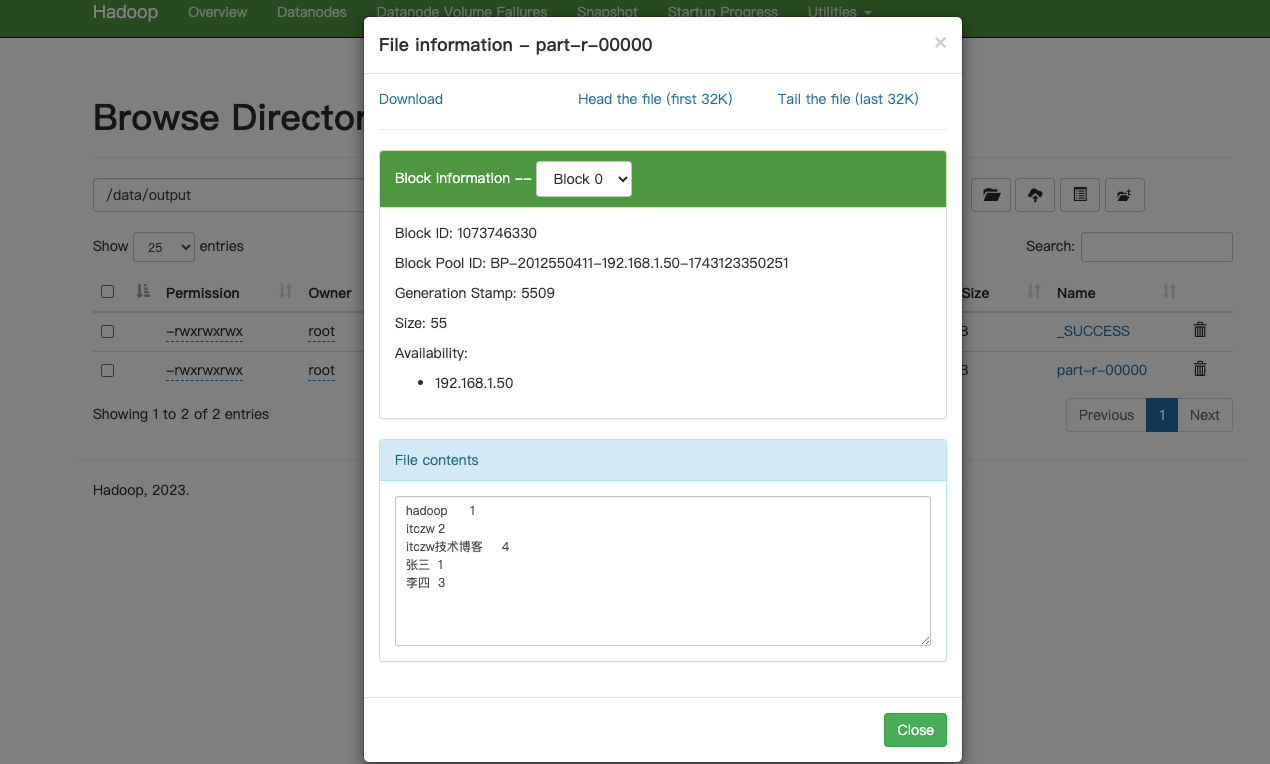
/data/inputword是HDFS中存储的文本文件,/data/output则是本次统计需要输出的HDFS中存储的文本文件,执行完后,hdfs会在/data/output路径下生成part-r-00000文件,此文件存放了本次统计的结果,如下图
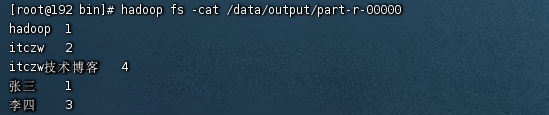
- 使用命令方式查看统计结果:
hadoop fs -cat /data/output/part-r-00000
异常
- 执行统计运算时可能会报以下错误
1
2
3
4
5
6
7
8
9
10
11
12
13
14
15
16
17
18
19
20
Error: Could not find or load main class org.apache.hadoop.mapreduce.v2.app.MRAppMaster Please check whether your <HADOOP_HOME>/etc/hadoop/mapred-site.xml contains the below configuration:<property> <name>yarn.app.mapreduce.am.env</name> <value>HADOOP_MAPRED_HOME=${full path of your hadoop distribution directory}</value></property><property> <name>mapreduce.map.env</name> <value>HADOOP_MAPRED_HOME=${full path of your hadoop distribution directory}</value></property><property> <name>mapreduce.reduce.env</name> <value>HADOOP_MAPRED_HOME=${full path of your hadoop distribution directory}</value></property> [2025-04-07 13:46:08.168]Container exited with a non-zero exit code 1. Error file: prelaunch.err.Last 4096 bytes of prelaunch.err :Last 4096 bytes of stderr :Error: Could not find or load main class org.apache.hadoop.mapreduce.v2.app.MRAppMaster- 解决方案:只需要在
mapred-site.xml中添加以下内容即可:
1
2
3
4
5
6
7
8
9
10
11
12
<property> <name>yarn.app.mapreduce.am.env</name> <value>HADOOP_MAPRED_HOME=/home/hadoop-3.3.6</value></property><property> <name>mapreduce.map.env</name> <value>HADOOP_MAPRED_HOME=/home/hadoop-3.3.6</value></property><property> <name>mapreduce.reduce.env</name> <value>HADOOP_MAPRED_HOME=/home/hadoop-3.3.6</value></property>/home/hadoop-3.3.6为hadoop安装目录